



Step Color Editor
Original price was: £39.99.£29.99Current price is: £29.99.
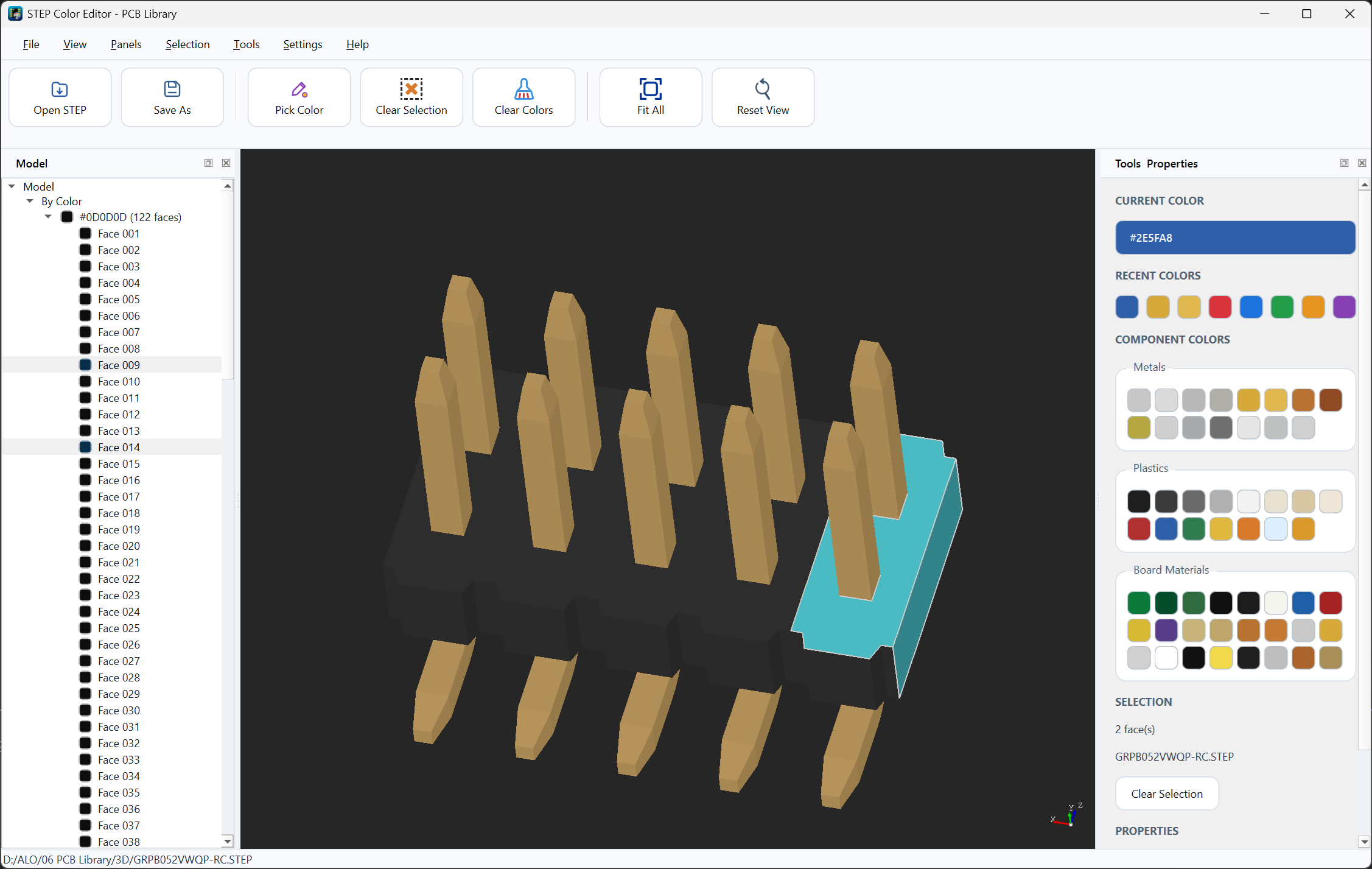
Step Color Editor is a desktop software tool for editing and managing colors in STEP 3D models. Ideal for PCB designers, electronics engineers, makers, and 3D model creators who need cleaner, more professional-looking component models for PCB libraries, documentation, product previews, and technical presentations.
Description
Official license purchase channel
Download the software at Microsoft Store
Step Color Editor is a desktop software tool designed for PCB designers, electronics engineers, 3D model creators, component library developers, and technical users who need to edit, organize, and improve the visual appearance of STEP 3D models.
Many STEP models used in PCB libraries, electronic components, mechanical assemblies, and technical documentation are supplied with missing, incorrect, inconsistent, or overly generic colors. This can make the model harder to identify, less professional in previews, and less suitable for use in PCB design tools, product images, documentation, or online component libraries.
Step Color Editor is designed to solve this problem by allowing users to apply, edit, and manage colors in STEP models using a practical color workflow. Instead of leaving models with default gray surfaces or inconsistent imported colors, the software helps create clearer and more professional 3D models with organized component colors.
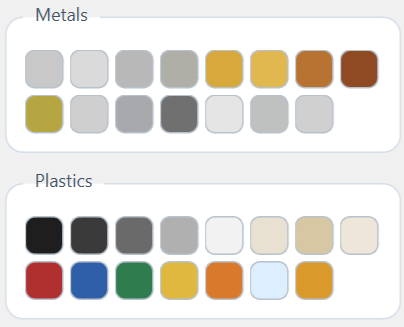
The software includes color palettes for common material categories such as metals, plastics, and board materials. This makes it especially useful when preparing electronic components, connectors, enclosures, PCB assemblies, mechanical parts, and product-related STEP files.
For PCB library creation, visual consistency matters. A well-colored 3D model can make components easier to recognize inside EDA tools, improve documentation quality, and create a more professional appearance for product pages, technical previews, and customer-facing libraries.
Main capabilities include:
– Open and view STEP 3D models
– Edit and apply colors to STEP model entities
– Manage component colors using organized palettes
– Use predefined color groups for metals, plastics, and board materials
– Quickly reuse recent colors during the editing workflow
– Select precise colors using HEX/RGB-style values
– Improve the visual appearance of electronic component 3D models
– Prepare STEP files for PCB libraries and EDA tools
– Create cleaner and more consistent 3D model previews
– Useful for component libraries, documentation, product images, and technical review
– Designed for PCB designers, electronics engineers, makers, 3D model creators, and technical users
Typical use cases:
– Add realistic colors to electronic component STEP models
– Improve STEP models before importing them into PCB design software
– Create visually consistent 3D models for PCB libraries
– Apply material-like colors to metals, plastics, and board-related parts
– Correct STEP models that import with missing or incorrect colors
– Prepare professional-looking component previews for websites or documentation
– Organize and reuse color palettes for faster editing
– Improve the appearance of connectors, modules, enclosures, mechanical parts, and PCB-related assemblies
Why STEP color editing is important:
Many STEP files are distributed with limited or poor color information. In some cases, the entire model may appear gray, while in other cases colors may be inconsistent or unsuitable for professional presentation. This can reduce the quality of PCB library previews, 3D documentation, and product images.
Step Color Editor helps users improve these models by applying clearer and more meaningful colors. This makes the final STEP model easier to understand, easier to present, and more suitable for professional engineering workflows.
License information:
This product includes a lifetime license key for the current major version of the software. The license can be activated on up to 2 computers.
After purchase, your license key will be generated automatically and sent to the email address used during checkout. You will need this license key to activate the software.
This is a digital product. No physical item will be shipped.
System requirements:
– Windows 10 or Windows 11
– Internet connection required for license activation
– STEP input files
Important notes:
The software is intended to assist with STEP model color editing, PCB library preparation, documentation, visualization, and technical presentation workflows.
Output quality depends on the structure and quality of the source STEP files provided by the user. Some STEP models may contain complex geometry or entity structures that affect how colors can be selected, edited, or exported.
Converted or edited STEP files should always be reviewed before being used in final production libraries, customer-facing documentation, or engineering release.
Related products
-
-
-40%
- Software
Vias On BGA
- Original price was: £10.00.£5.99Current price is: £5.99.
- Add to basket
-
-40%
-



-
-38%
- Software
Gerber to DXF and ODB++ Converter
- Original price was: £79.99.£49.99Current price is: £49.99.
- Add to basket
-
-38%
Reviews
There are no reviews yet.